MKP-9-1 LORAWAN Wireless Motion Sensor


Short Description:
Product Detail
Product Tags
Features
● RF RF Frequency: 900MHz (default) / 400MHz (optional)
● Communication Distance: >2km (in open area)
● Operating Voltage: 2.5V–3.3VDC, powered by one CR123A battery
● Battery Life: Over 3 years under normal operation (50 triggers per day, 30-minute heartbeat interval)
● Operating Temperature: -10°C~+55°C
● Tamper detection supported
● Installation Method: Adhesive mounting
● Displacement Detection Range: Up to 12 meters
Detailed Technical Parameters
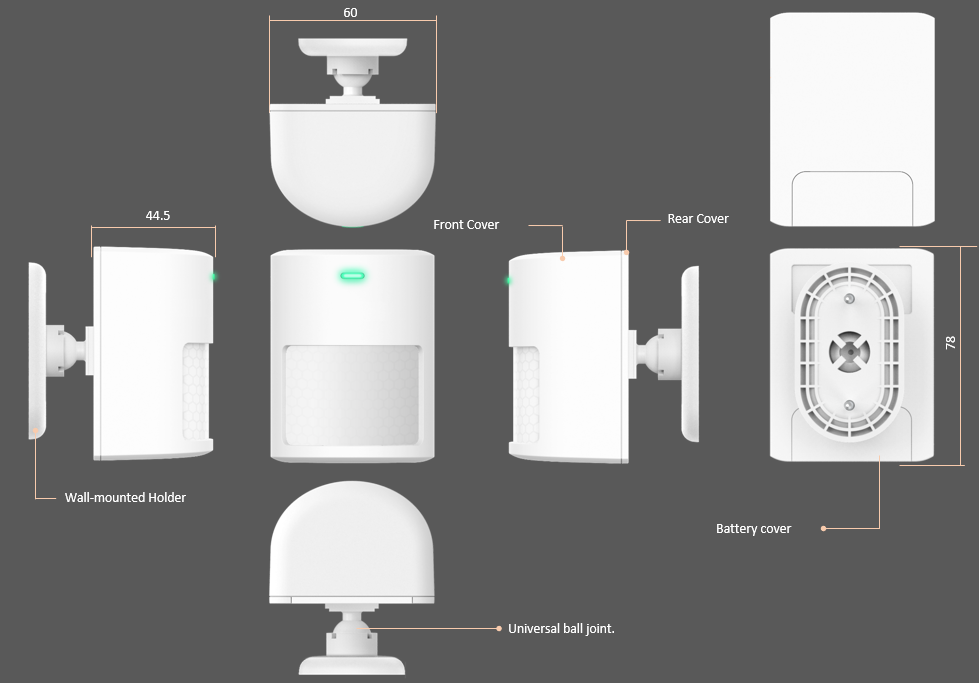
| Product Dimension Drawing |
 |
| Package List | |
| Wireless Motion Sensor | X1 |
| Wall Mount Bracket | X1 |
| Double-sided Adhesive Tape | X2 |
| Screw Accessory Kit | X1 |
| Software Functions | |
| Device Connection (OTAA) Mode | The device can be added by scanning the QR code on the device via the application. After installing the battery, the detector immediately starts sending join requests, with the LED blinking every 5 seconds for 60 seconds. The LED stops blinking once the join is successful. |
| Heartbeat |
|
| LED & Function Button | The button function is triggered when released, and the device detects the button press duration: 0–2 seconds: Sends status information and checks the network status after 5 seconds. If the device is connecting to the network, the LED blinks every 5 seconds for 60 seconds until the connection is established, then stops blinking. If the device is already connected to the network and the current message is successfully sent to the platform, the LED stays on for 2 seconds and then turns off. If the message transmission fails, the LED blinks with a cycle of 100ms on and 1s off, and turns off after 60 seconds. 10+ seconds: The device restores to factory settings 10 seconds after the button is released. |
| Time Synchronization | After the device successfully connects to the network and starts normal data transmission/reception, it completes the time synchronization process during the transmission of the first 10 data packets (excluding packet loss test scenarios). |
| Packet Loss Rate Test | ● When the product is installed and operated for the first time, it performs a packet loss rate test after completing time synchronization. A total of 11 data packets are sent, including 10 test packets and 1 result packet, with an interval of 6 seconds between each packet. ● In normal working mode, the product also counts the number of lost packets. Generally, it sends an additional packet loss statistics result for every 50 data packets transmitted. |
| Event Caching | If an event trigger message fails to send, the event is added to the event cache queue. Cached data is sent when the network condition improves. The maximum number of cached data items is 10. |
| Operation Instructions | |
| Battery Installation | Install one 3V CR123A battery correctly. Rechargeable batteries with non-3V voltage are prohibited, as they may damage the device. |
| Device Binding | Bind the device via the platform as required (refer to the platform operation section). Once the device is added successfully, wait approximately 1 minute before use. After a successful connection, heartbeat data packets are sent every 5 seconds for a total of 10 times. |
| Operation Process | ● When the reed switch sensor detects the magnet approaching or moving away, it triggers an alarm report. Meanwhile, the LED indicator lights up for 400 milliseconds. ● Removing the back cover of the reed switch sensor also triggers an alarm report. ● Alarm information is transmitted to the platform via the gateway. ● Press the function button actively within 2 seconds to check the current network connection status of the sensor. ● Press and hold the button for more than 10 seconds to restore the sensor to factory default settings. |
| Button & Indicator Status Description | 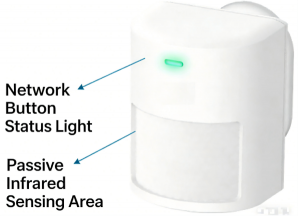 |
| Firmware Upgrade | This product supports the standard LoRaWAN FUOTA (Firmware Over-the-Air) upgrade function. A FUOTA upgrade typically takes about 10 minutes to complete. |
| Product Dimension Drawing |
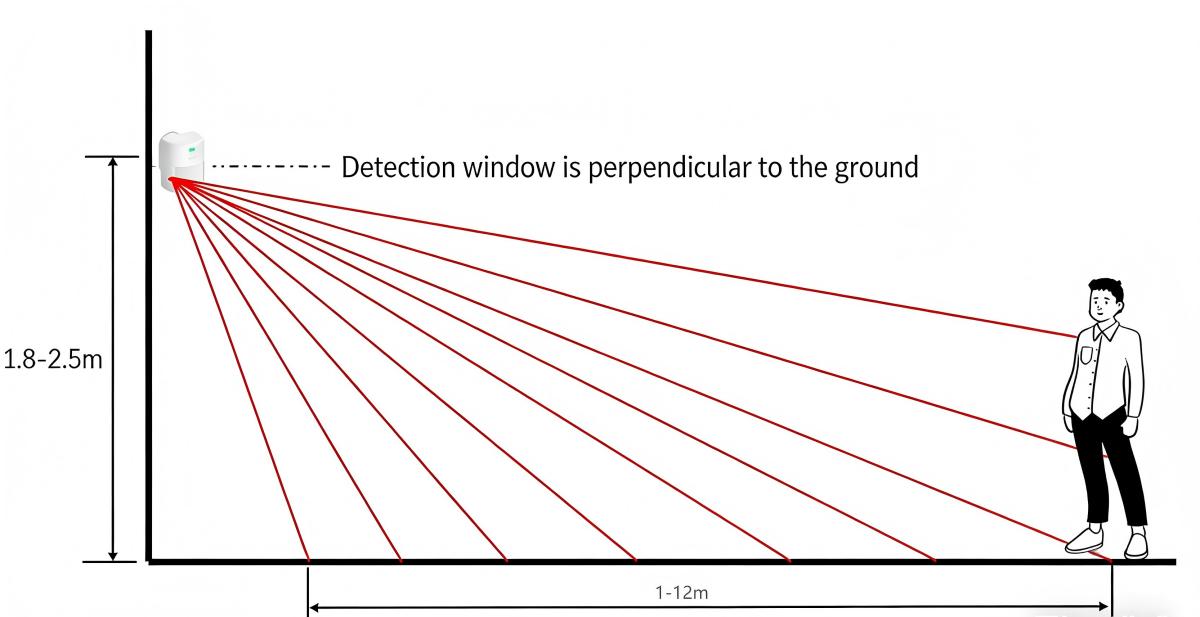 |
| ● Installation Location: Choose an area that intruders are likely to pass through for
monitoring. It is recommended to install the device 1.8–2.5 meters above the ground, with the optimal installation height being 2.3 meters. The installation angle should be 90 degrees perpendicular to the ground to achieve maximum detection coverage. The detection coverage on both the left and right sides is a 90-degree fan-shaped area. ● This product supports two installation methods: adhesive mounting and screw fixing. ● Ensure there are no obstacles within the product's detection range to avoid affecting detection performance. ● Install the device away from objects that generate temperature changes (e.g., air conditioners, electric fans, refrigerators, ovens) and avoid direct sunlight. ● If there are obstacles (e.g., walls) between the product and the gateway, the wireless communication distance will be reduced. |